For anyone in their 50s, 60s or 70s choosing a frame for a parent, a spouse or themselves, and for the grown kids who set it up.
Some digital picture frames have no subscription at all, and some work free but tie extra features to an optional yearly plan. As of November 2026, Aura says its frame has no subscription. Skylight’s frame works on a free tier, with an optional Plus plan. Nixplay has a free plan with a small storage limit, plus two paid plans. The Frameo app is free. Every one of them needs home Wi-Fi to receive new photos, and the family needs a phone app or an email address to send them.
We did not test these frames for this guide. Plans, prices and features are from each maker’s own pages, checked November 2026.
Checked November 2026. We read the makers’ pages on November 23, 2026. We print no box prices, because sales change weekly. Plan prices are list prices as of November 2026. Confirm before you buy.
Some links in this guide are affiliate links. If you buy through one, we may earn a small commission at no extra cost to you. It never changes what we recommend. As an Amazon Associate I earn from qualifying purchases. We earn nothing from the free shared-album route below, from our printable cards, or from the makers’ own pages we link. We do not print Amazon prices, because Amazon changes them often.
The short version
- Try a free shared album first. A shared album on a phone, tablet or TV the family already owns costs nothing.
- Read the plan, not the box price. The yearly plan is what keeps costing money.
- Wi-Fi at the frame is a must for new photos. A Wi-Fi frame cannot receive new photos without it.
- The sender needs an app or the frame’s email address. The person who gets the frame does very little.
- Set it up and load photos before you wrap it. Then tape a note inside the box.
Which Kind of Digital Picture Frame: Wi-Fi App Frame or Memory-Card Frame?
There are two kinds. One gets new photos over the internet from the family. The other plays photos someone loads onto a card or a stick. A few do both.
Start with a free shared album
Before you buy anything, try a shared album. It earns us nothing, and it may be all you need.
Google says that in a shared Google Photos album, anyone with access can view the photos and add to the album, even contacts who do not use the Google Photos app. Only the owner can remove someone. On a Google TV, Settings, then System, then Ambient mode lets you pick an album as a screensaver. Google Photos sharing page
Apple’s iCloud Shared Albums let invited people add their own photos and videos, and the organizer can remove participants. From iOS 27, friends and family can join on the web without an Apple Account or an Apple device. Steps differ for iOS 26 and earlier. An Apple TV 4K can use a shared album as a screen saver, on the default profile only. Apple’s Shared Albums page
The catch: someone has to keep adding photos, and you need a screen to show them. We found a TV screensaver route only for Google TV and Apple TV 4K.
A Wi-Fi frame the family can send photos to
Aura, Skylight, Nixplay and Frameo are this kind. The frame joins home Wi-Fi, and family members send photos from their own phones, from anywhere. It takes home Wi-Fi at the frame and, on the sender’s side, the maker’s app or the frame’s own email address. The person looking at the frame does nothing once it is set up.
A frame you load yourself with a memory card or USB stick
This type has a slot for a Secure Digital (SD) card or a Universal Serial Bus (USB) stick. Someone loads photos on it and the frame plays them. The trade-off: a person has to be at the frame to change the photos. That suits a shelf frame you fill yourself, less so when the family lives far away.
Which one fits?
Our own judgment: if the family lives far away and will send photos all year, a Wi-Fi frame fits. If the home has no Wi-Fi, or nobody wants another app, a frame that plays from a card fits better. If you are not sure, a free shared album shows whether anyone will keep sending.
What Does a Digital Picture Frame Cost After the Box?
Here are the four makers side by side. Storage is in gigabytes (GB) and megabytes (MB), and Wi-Fi bands are in gigahertz (GHz). Plan prices are US list prices from each maker’s own page, as of November 2026.
Table 1: Frames side by side, what you pay after the box
| Frame | Plan after the box | Storage the maker states | How family sends | Wi-Fi | Plays without Wi-Fi | The catch |
|---|---|---|---|---|---|---|
| Aura Carver Mat 10-inch | None; Aura says no subscription | Aura says unlimited cloud storage | Free Aura app, text, email, web, camera roll | Required; spec lists a 2.4 GHz router | Not stated on the pages we read | App needed for setup and invites; plugs in |
| Skylight Frame 2 10-inch | Free tier; optional Plus $39 a year, cancel any time | 16 GB on the frame, up to 16,000 photos | Free Skylight app or email, no account needed | Required to receive; band not stated | Keeps showing loaded photos | Albums, remote control and cloud backup need Plus |
| Nixplay 10.1-inch touch (W10K) | Basic free; Lite $19.99 a year; Plus $29.99 a year | 500 MB, 100 GB or unlimited, by plan | Nixplay app, web app, or email to the frame’s address | 2.4 GHz | Cached photos keep playing; no new ones arrive | Free plan is small |
| Frameo-powered frames (many brands) | App free; Frameo+ $16.99 a year or $1.99 a month | Set by the frame brand | Free Frameo app, with a connection code | Required; band not stated | Not stated on the pages we read | Price, warranty and screen come from the brand |
| Pix-Star LUX frames | None; Pix-Star says free for life | 16 GB on the frame | Email, free app or website; or load a USB stick or SD card | Wi-Fi 6, 2.4 and 5 GHz | Pix-Star says photos keep displaying | No new photos by email or web album without Wi-Fi; we link none |
Note: Plan prices are the makers’ list prices as of November 2026 (maker plan pages, checked November 23, 2026). Confirm before buying. No box prices are printed.
Check the Aura Carver Mat on Amazon
Check the Skylight Frame 2 on Amazon
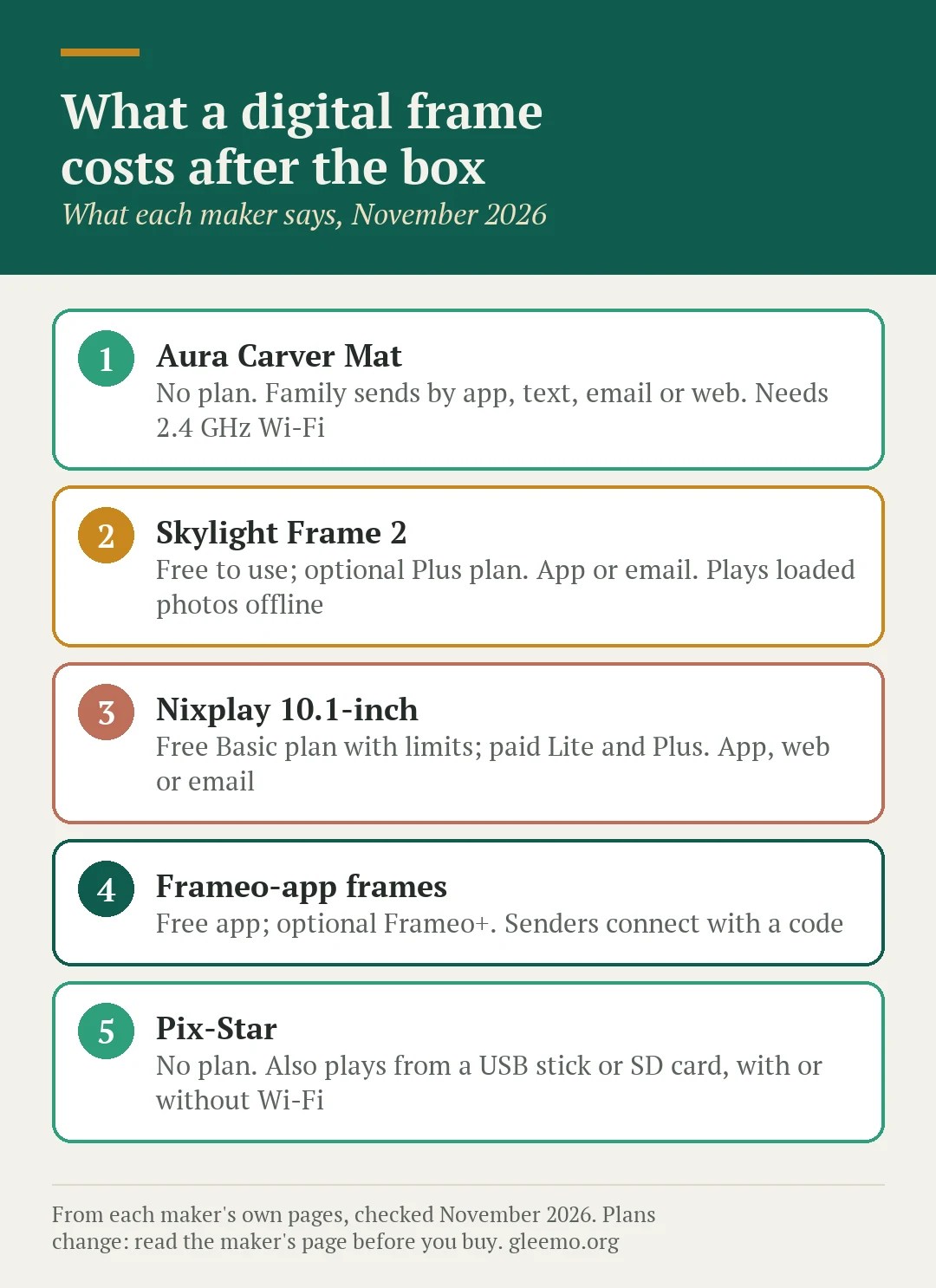
Our card: what each frame needs after the box.
Aura
Aura’s Carver Mat page says: "No, there are no subscriptions or fees for your Aura frame." Aura says storage is unlimited. These are Aura’s own statements, and we found no paid Aura plan on any Aura page we read. The app is required for setup, for inviting people and for settings, and Aura says a Wi-Fi connection is required. Aura Carver Mat page
Skylight
Skylight’s Frame works on a free tier. Plus is optional: $39 a year, cancel any time, as of November 2026. One Plus covers all your Skylight frames, and adds albums, remote control and cloud backup. If you cancel, you lose the Plus features right away and are not billed again.
On the free tier, family can send and view photos by app or email. We claim nothing more for the free tier. The frame holds 16 GB, up to 16,000 photos, and replaces the oldest photos when full. The Skylight Calendar is a different product with its own plans, so do not mix them up with the Frame’s. Skylight Plus page
Nixplay
Nixplay has three plans, US list prices as of November 2026:
- Basic: free. 500 MB of photos, 15-second videos, 1 shared album, 3 members, 5 connected frames.
- Lite: $19.99 a year. 100 GB of photos, 1-minute videos, unlimited shared albums, 10 members, 10 connected frames.
- Plus: $29.99 a year. Unlimited photo storage, 2-minute videos, up to 20 members in shared frames.
Nixplay’s plans page was last updated October 12, 2026. You buy an upgrade in the Nixplay app. The free plan is small: at the 3 MB photo cap, 500 MB holds 166 photos (our arithmetic). Over the limit, older content on the frame is replaced. Nixplay says shared content does not count toward the recipient’s storage.
Nixplay sells two 10.1-inch touch frames. The one we link is the Nixplay 10.1-inch touch frame (W10K) on Amazon. Nixplay plans page
Frameo
Frameo is software, not a frame. Frameo says it sells licenses to manufacturers, who make Frameo-powered frames sold by brands in stores and on marketplaces such as Amazon. The Frameo app for iPhone and Android is free, and Frameo says: "Frameo is free forever."
Free means unlimited connected frames, photos sent up to 10 at a time, and videos up to 15 seconds. Frameo+ is $16.99 a year or $1.99 a month, as of November 2026. It adds 100 photos at a time, 2-minute videos and remote management of a frame’s photos. Frameo says all paid plans come with a 14-day free trial.
The catch: the frame’s price, warranty and screen come from whichever brand made it. We name and link no Frameo-powered frame. Frameo plans page
Aura or Skylight?
We name no winner. Pick by need.
- Choose Aura if you want no plan to manage. Aura says there is no subscription. We could not confirm what it shows offline.
- Choose Skylight if you want a free tier and a frame that keeps showing loaded photos without Wi-Fi. Plus is $39 a year if you want albums, remote control or cloud backup.
Our five-year math
This is our arithmetic at today’s plan prices, as of November 2026. It is not a promise, because makers change plans.
- Skylight Plus: $39 x 5 = $195.00 (three years: $117.00)
- Nixplay Lite: $19.99 x 5 = $99.95
- Nixplay Plus: $29.99 x 5 = $149.95
- Frameo+ yearly: $16.99 x 5 = $84.95
- Frameo+ monthly: $1.99 x 60 months = $119.40
- Aura, the Skylight free tier, Nixplay Basic and free Frameo: $0
Plan prices only, from the makers’ pages as of November 2026. Box prices are not included.
Box prices change, so check the plan
Around the holidays, box prices and bundles change often, and a deal on the frame is not a plan price. Read the plan page, and ask what happens when any promotion ends.
Can a Digital Picture Frame Work Without Wi-Fi?
Yes for some, with limits. The difference is between showing photos already on the frame and receiving new ones.
Frames that display photos without Wi-Fi
Skylight says that once photos are on a Frame 2, you can enjoy them without Wi-Fi, and new photos download when the internet returns. Nixplay says cached content keeps playing if the frame loses Wi-Fi, though Offline Mode "is not intended as a workaround" and stops new content from arriving while the frame is offline.
Pix-Star’s own pages go further. Pix-Star says a frame can work without any wireless connection as a basic photo frame, playing photos from a USB stick, an SD card or its built-in storage. It says its cloud storage, app and photo-sending methods are "free for life, with no subscription and no hidden charges." These are Pix-Star’s own statements. We link no Pix-Star frame. Pix-Star specifications
For Aura and Frameo, we could not verify what happens when Wi-Fi drops, so we say nothing.
What no Wi-Fi costs you
No new photos from the family until the frame is online again. Pix-Star’s own FAQ says that without an internet connection you cannot receive photos by email or open web albums.
If your parent does not have home Wi-Fi
Ask this before you buy. A Wi-Fi frame without Wi-Fi shows only what is already on it. Your choices are to add Wi-Fi at the home, or to pick a frame that plays from a card or stick and accept that someone loads it by hand.
We did not confirm a card-only frame from an established maker that is available now, so we recommend none. We also have no source for a workaround, so we do not suggest one.
How Does the Family Add Photos to the Frame?
For the grown kids: this is your side of the setup. The person with the frame usually does nothing.
With an app
- Aura: the free Aura app, which is also required for setup and invites.
- Skylight: the free Skylight app. Skylight says family can add photos "without creating an account or subscribing."
- Nixplay: the Nixplay app.
- Frameo: the free Frameo app. The frame shows a connection code valid for 12 hours. You share it by text, email or phone call, and once your friend enters it in their app, they can send photos.
By email, text or the web
- Skylight: each frame gets its own email address, in the form name@ourskylight.com. Skylight says photos appear in less than 60 seconds.
- Nixplay: the web app, or email to the frame’s own address.
- Aura: text, email and the web, as well as the app.
From an iPhone, an Android phone or a computer
Aura works with iOS and Android, and so does the Frameo app. Nixplay also has a web app, and Skylight and Nixplay both take email.
How many people can send?
- Aura: Aura says you can invite unlimited family and friends.
- Skylight and Frameo: no sender limit is stated on the pages we read. Free Frameo lets each sender send up to 10 photos at a time.
- Nixplay: members in shared frames are 3 on Basic, 10 on Lite and 20 on Plus.
Set It Up Before You Give It
A frame that arrives already showing photos is a better gift than a box and a to-do list. If you have prints to scan first, see our guide to digitize old photos and VHS tapes.
Six steps, in order
This is our own order. Follow each maker’s setup steps for its app and Wi-Fi.
- Make the account in your name or theirs. Decide now who signs in, and write it down.
- Connect it to the Wi-Fi it will live on. At their home if you can, or bring the network name.
- Invite the family who will send photos. They send through the maker’s app or the other way in.
- Load 20 to 30 photos before you wrap it. Then it lights up with something on the first day.
- Write the note for the box. Wi-Fi name, the app, who can add photos, who to call.
- Plug it in on the day and watch it start. Stay for the first few photos to arrive.

Our card: six steps to set up a digital frame before you give it.
The note to put in the box
Fill in the card below, fold it and tape it inside the lid. Blanks cover the Wi-Fi name, the frame’s app, who can add photos, what to do if the photos stop, and who to call. Keep passwords off this card.

Our card: the note that goes in the box, with blanks to fill in.
If you give it as a gift
Each maker has its own way to pre-load a frame, and the words differ.
- Aura says you can pre-load a frame with photos, videos and a message. Scan the quick response (QR) code on the back of the box, or set it up in the Aura app. Aura’s word is "pre-load."
- Skylight calls it "Gift Mode." You pre-load photos from the app and share a 6-digit activation code with the recipient. You do not need the frame in hand. They plug in, connect Wi-Fi and enter the code.
- Nixplay says you can preload photos, videos and a welcome message, and the recipient follows the on-screen gift setup.
Who Can Send Photos to the Frame? Privacy and Safety
Anyone allowed to send can put a photo on the screen. Decide who is on the list, and review it now and then.
The invite, and how to remove someone
- Skylight: you choose "Everyone," meaning anyone with the frame’s email address, or "People I approve," where each new sender must be approved. Approval cannot be done on the frame. It is done by the link in the approval email sent to the owner. You can block or unblock senders in the app’s Manage Users.
- Frameo: delete a friend on the frame to remove their permission to send. The frame offers to remove their photos too.
- Google Photos: only the album’s owner can remove someone.
- Apple Shared Albums: the organizer can remove participants.
- Aura: we could not read Aura’s steps for removing someone, because its help center was blocked to us. Check Aura’s help center before you rely on it.
The frame’s email address or code
Whoever knows a frame’s email address can send to it unless the owner restricts senders. With Skylight, that is the "Everyone" versus "People I approve" choice above. Frameo’s connection code is valid for 12 hours.
Share the address or code only with people who should send, and write who they are on the note for the box.
For a Parent, a Spouse or Yourself
Some readers are asked "what should we get Mom?" Some buy for themselves. The same questions apply.
What is simplest to run, by what the makers say
We will not rank. Our own yardstick: the person looking at the photos does nothing, and the sender needs only an app or an email address. By that yardstick, Skylight says family can add photos without an account, and Skylight and Nixplay both accept email at the frame’s own address.
If you are the one who will look at the photos
Ask the family to send photos, and tell them how. Keep the note from the box handy.
If you are the one setting it up for someone else
Do the six steps above at your own table, and use the pre-load route your maker offers. For more gift ideas, see our Christmas gifts for mom and dad guide.
Is a Digital Picture Frame Worth It?
It is worth it when the family will actually send photos and you have read the plan. After the box it can cost $0, or, by our arithmetic at plan prices as of November 2026, up to $195.00 over five years if you choose Skylight Plus.
The honest catch for each type
- Aura: the no-subscription and unlimited statements are Aura’s own, and we found nothing on offline behavior.
- Skylight: Plus is optional. For the free tier we claim only that family can send and view photos by app or email.
- Nixplay: the free plan is small, and older content on the frame is replaced when you pass the limit.
- Frameo: the price, warranty and screen come from the brand.
- Card or stick frame: someone has to be at the frame to change photos.
- Any Wi-Fi frame: no home Wi-Fi, no new photos.
When a printed photo is the better gift
This is our own judgment. If the family will not send photos, or the home has no Wi-Fi and nobody will load a card, a printed photo in a good frame is the simpler gift. It has no plan, no app and no password.
Frequently Asked Questions
Is there a digital picture frame with no subscription?
Yes. Aura says its frame has no subscription. Skylight and Nixplay have free tiers, and Frameo says it is free forever. Each has limits or optional plans. See Table 1.
Is there a monthly fee for the Aura frame?
Aura says no: "No, there are no subscriptions or fees for your Aura frame." We found no paid Aura plan on any Aura page we read.
Can I use Frameo without a subscription?
Yes. Frameo says "Frameo is free forever." Free lets you send photos up to 10 at a time and videos up to 15 seconds. Frameo+ is $16.99 a year or $1.99 a month, as of November 2026.
What is better, Skylight or Aura?
It depends. Aura has no plan to manage, by its own statement. Skylight has a free tier and keeps showing loaded photos when Wi-Fi is off, with Plus at $39 a year as of November 2026.
Can I use a digital picture frame without Wi-Fi?
For showing photos already loaded, some can: Skylight and Nixplay keep playing what is on the frame. Pix-Star says its frame can play from a USB stick or SD card with no Wi-Fi at all. No Wi-Fi frame receives new photos without Wi-Fi.
Is there a frame where others can send photos from anywhere?
Yes. Aura, Skylight, Nixplay and Frameo all let family send photos from their own phones.
How do I transfer photos from my phone to a digital picture frame?
Use the maker’s app: Aura, Skylight, Nixplay or Frameo. Skylight and Nixplay also take email. For a card or stick frame, follow the frame’s own instructions.
Do digital picture frames need to be plugged in all the time?
The three frames we link (Aura Carver Mat, Skylight Frame 2, Nixplay 10.1-inch touch) ship with a power cord and plug in. Aura also sells a cordless e-paper frame; we did not read the fine print on its battery claim, so we do not repeat it. Skylight and Frameo have screen sleep schedules that turn the screen off to save power.
Are digital picture frames worth buying?
When the family will send photos and you have read the plan, yes. Check the Wi-Fi and who can send first.
The Bottom Line
Pick the kind first: a Wi-Fi frame the family sends to, or a frame you load by hand. Read the plan, not the box price. Set it up, load the photos and tape the note inside the box before you wrap it.
If you are still choosing, start with a free shared album and see who sends photos. Then, if you buy a frame, you will know the family will use it. For another way to see what a gadget costs after the box, see our guide to bird feeder cameras.
