Some links in this guide are affiliate links. If you buy through one, we may earn a small commission at no extra cost to you. It never changes what we recommend. As an Amazon Associate I earn from qualifying purchases.
Mom’s shoebox of prints ended up with you, and Dad’s VHS tapes are still in the garage. Can you digitize old photos and VHS tapes for free? Often, yes. You may not need to buy anything. Start at the library.
Some libraries have a free "memory lab" with equipment to scan prints and copy tapes. There is no national list, so search your library’s website for "memory lab" or "digitization station," or ask the reference desk. No lab? Paid options are the fallback, and we priced them. This guide compares six paths for one shoebox of about 500 prints and 3 VHS tapes: a library lab, your phone, a mail-in service, a store drop-off, a home scanner, and, for tapes, the library or a paid service.
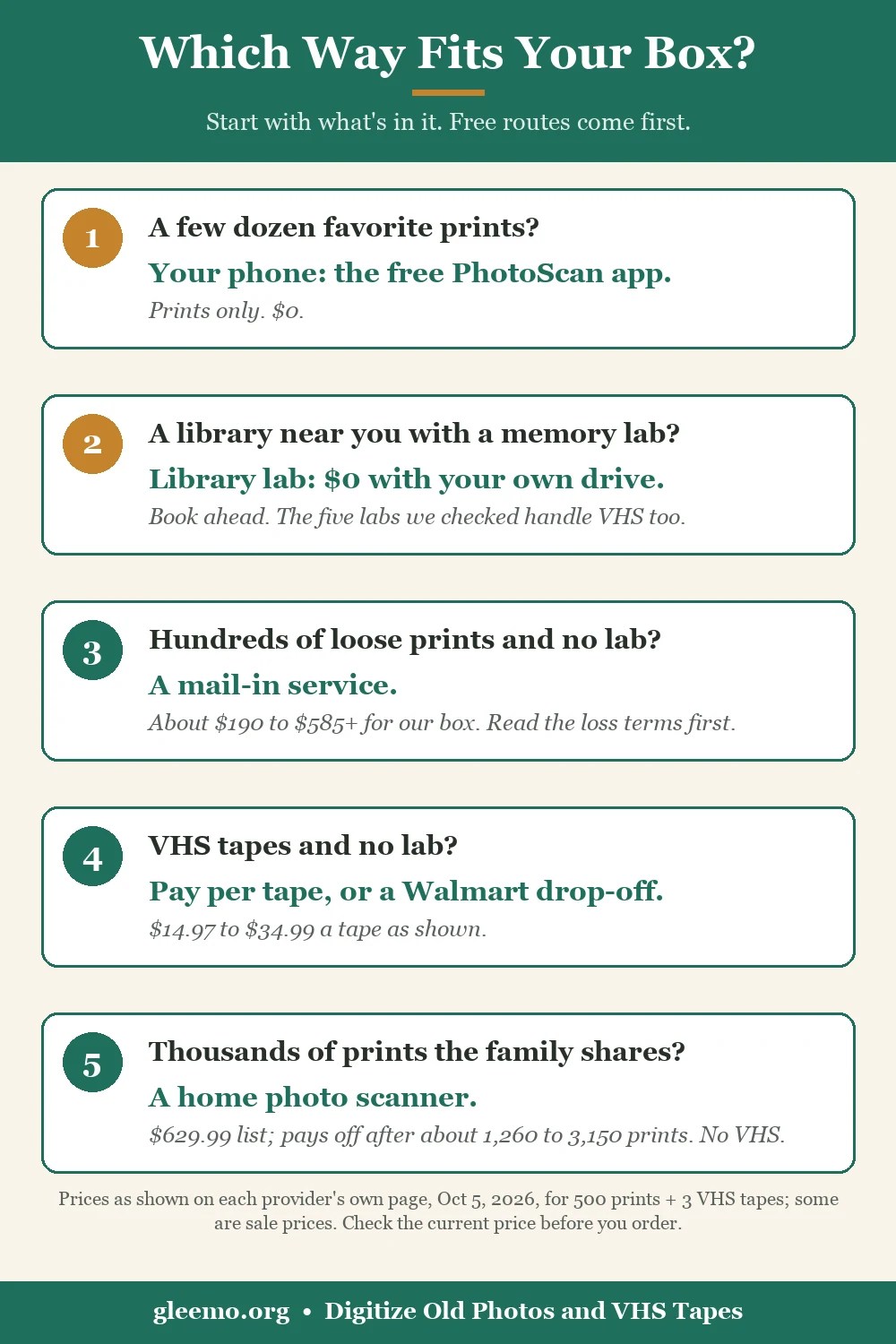
The Short Answer: Free First, Then Pay Only Where It Helps
- Count what you have. Prints, slides and tapes are priced differently.
- Check for a library lab. The five we checked call it free and handle VHS. Call first; rules are local.
- Phone for a few dozen favorites. PhotoScan is free, prints only.
- Mail in big piles of loose prints. Per-photo mail-in services priced our box at about $190 to about $585 or more, as shown on Oct 5, 2026. The low end rests on sale prices.
- Tapes need a VCR. The library costs you time. A service costs money.
A scanner only pays off for a big collection, and it does nothing for VHS.
First, Count What Is in the Box
Sort the box into prints, slides and negatives, VHS or camcorder tapes, and film reels, because companies price different units. Albums are a snag: ScanMyPhotos does not scan them, and Legacybox’s bulk photo box takes loose prints only. Our example is about 500 loose prints (standard snapshot size) plus 3 VHS tapes of up to 2 hours each.
Free Option 1: Digitize Old Photos and VHS Tapes for Free at a Library Memory Lab
Our top pick for most families is the free lab, if you have one within reach. Here is what five libraries say on their own pages, checked Oct 5, 2026.
- Steubenville, Ohio: "completely free if you bring your own flash drive or save your memory to the cloud" ($10 flash drives on request). VHS and photos.
- Mid-Continent, Missouri: "Lab access is free," in three-hour appointments. VHS, photos, negatives, slides.
- Nashville, Tennessee: a March 16, 2026 library release calls it free. Four-hour slots, staff beside you the first hour.
- DC Public Library: 3-hour sessions; library card and photo ID at the first visit. A 2022 library article calls it free for cardholders. Hi8, Video8 and Digital8 were "currently unavailable" on Oct 5, 2026.
- San Mateo County, California: one-hour appointments, a waiver, a library card login. A December 2025 library blog calls it a "free service."
Steubenville’s page says equipment use is "at your own risk" and the library is not responsible for damage to personal materials. It also says "VHS conversion takes as long as your VHS tape is," but we can only say that for Steubenville, so ask your lab.
How to Find a Free VHS-to-Digital Lab Near You
There is no current national directory. The Memory Lab Network’s map (133 entries, no visible update date) lists DC’s lab but not the other four above, so treat the Memory Lab Network as a starting point only.
Libraries use names like Memory Lab, Digitization Station or Heritage Studio. Search "[your library] memory lab OR digitization station OR VHS to digital," then ask the reference desk:
- Do you have equipment to convert VHS tapes and scan prints, and is it free?
- Do I need a library card and a reservation?
- How long is a session, and can I save to my own drive?
If the answer is no, the paid options below are your fallback.
What to Bring to a Library Lab
- A drive or cloud account to save to (Nashville, Steubenville, DC)
- A reservation (Nashville, DC, Mid-Continent, San Mateo)
- A library card (DC, San Mateo)
- A signed waiver or release (DC, San Mateo)
Free Option 2: The Phone You Already Own (Prints Only)
PhotoScan by Google Photos is free, and as of Oct 5, 2026 it is on the US App Store (iPhone, iOS 15 or later) and Google Play. Its listing promises glare-free scans, auto-crop and backup with Google Photos. It scans prints only, and Google publishes no speed figure. The last updates were November 2022 (iPhone) and July 2023 (Android). We found no retirement notice, but check that it installs on your phone first.
Photomyne is free to download with a trial, but its App Store listing says "Subscriptions renew automatically unless canceled at least 24 hours before the end of the current billing period." A phone suits a few dozen favorites. That is our judgment call, not a tested number.
What One Shoebox Really Costs, Six Ways
The same shoebox, priced on each company’s own page on Oct 5, 2026. Free routes come first.
| Path | Total, 500 prints + 3 tapes | Who, and how long | Your files | Originals | The catch |
|---|---|---|---|---|---|
| 1. Library Memory Lab | $0 with your own drive | You; one lab says tapes run in real time | Yours | Stay home | Local; book ahead, maybe a card |
| 2. Phone app (PhotoScan) | $0, prints only | You | Yours | Stay home | Tapes not covered |
| 3a. Mail-in: ScanMyPhotos | $190.76 with tapes at the $14.97 shown ($235.70 at list) | Company; photos 3 to 6 weeks | 5-day download link; no copy kept | Mailed, returned | Excludes your outbound postage |
| 3b. Mail-in: Capture | $222.95 with return shipping (you pay postage to send it); $235.44 with its two-way label | Company; 2 to 3 weeks | 90 days, then $4.99 a month | Mailed, returned | Liability capped at $100 |
| 3c. Mail-in: iMemories | $289.97 at sale prices shown ($584.97 at list), return shipping NOT included | Company; pages differ on time | Free download | Mailed, returned | Return fee, amount not published |
| 4. Mixed-media box: Legacybox (23 items) | $779.92 at list ($389.96 only at a bundle marked "ends soon") | Company; 4 to 6 weeks (page also says 3 to 4) | 30-day trial, then $7.99 a month | Mailed, returned | 1 item = 1 tape or 25 prints |
| 5. Store drop-off: Walmart (Capture does the work) | $322.23 with 2-hour tapes ($289.47 with 1-hour) | Capture; 3 to 4 weeks | 60 to 90 days, then a fee | Left at store, shipped, picked up | Pay at pick-up |
| 6. Home scanner: Epson FastFoto FF-680W | $629.99 list for prints; tapes extra ($0 at a library, $64.86 to $97.02 paid) | You; Epson: as fast as 1 photo per second at 300 dpi | Yours | Stay home | Does nothing for VHS |
Note: Prices as of Oct 5, 2026; check the current price before you order. Totals exclude sales tax. Tape totals assume 2-hour tapes, and a longer tape costs more.
We priced one shoebox, 500 prints and 3 tapes, on each provider’s own price page on October 5, 2026. Several of the lowest totals are sale prices as shown that day, with no end date printed. Epson’s page showed $529.99 for Oct 4 to Oct 10, 2026 only, and Legacybox’s bundle banner said "ends soon."
Today’s prices are on each company’s own page: Check current price: ScanMyPhotos individual photo pricing, Check current price: Legacybox kit pricing, or Check current price: Epson FastFoto FF-680W (also on Amazon). These are not rankings. Among mail-in services we found no clear winner, because the cheapest differ on what you keep and on their loss terms.
Mail-In Services: Per Photo vs Per Box
Per photo and per box are product types, and some companies sell both. As shown on Oct 5, 2026, ScanMyPhotos charges 20 cents a scan at 300 dpi or 50 cents at 600 dpi (a $25 minimum, credited), and its page says orders must be postmarked within 30 days or "the pricing will go back to our regular pricing." Its prepaid box holds about 1,800 photos and was shown at $169 at 300 dpi, the same price if you fill it with 500. Legacybox’s separate Photo Legacybox is $19.99 per 200 loose prints.
DC Public Library’s lab guide suggests a resolution of "at least 600 for photos." At ScanMyPhotos’ 600 dpi setting, the prints alone run $275.90, against $125.90 at 300 dpi. Some older roundups still recommend DigMyPics, but its own site says it is "no longer accepting any orders or incoming media."
Dropping It Off at a Store: Walmart Takes It, Capture Scans It
Walmart’s Home Movie & Photo Transfer takes your media at the counter, and Capture digitizes it elsewhere. As shown on Oct 5, 2026, prints are $15.96 for the first 35, then $0.45 each, and each tape is $15.96 for its first 30 minutes, then $5.46 per extra 30. The page says "3 – 4 Week Processing (Including Shipping Time)."
Your originals leave the store, but you skip packing and postage. Walgreens and CVS have transfer pages, but we could not price them. Costco’s photo centers closed on Feb 14, 2021.
Buying a Scanner: When It Pays for Itself
Epson’s FastFoto FF-680W was in stock at epson.com on Oct 5, 2026, at an "Our Price" of $629.99, and its page lists no slide or negative scanning.
A home photo scanner at Epson’s $629.99 list price starts to cost less than a per-photo service somewhere between about 1,260 and 3,150 photos for the mainstream services we priced, and well past that for the cheapest bulk boxes, and it does nothing for VHS tapes. It is about 637 photos against iMemories’ list price and 6,300 to 7,875 against Legacybox’s bulk boxes, and the math ignores your time, a drive and software. A scanner wins only for a big collection, or one the family shares.
How Much Does It Cost to Digitize a VHS Tape? Your Time or Your Money
Both routes work; it is time against money. All five labs handle VHS and call the service free, but Steubenville says capture runs in real time. If that holds at your lab, three 2-hour tapes mean 6 hours: 2 sessions at the 3- or 4-hour labs, or 6 one-hour appointments at San Mateo.
Per tape, as shown on Oct 5, 2026:
- ScanMyPhotos: $14.97 shown ($29.95 at list). Confirm in your cart that it is per tape.
- iMemories: $14.99 with a sale code, $29.99 at list.
- Capture: $19.99.
- Walmart: $21.42 for a 1-hour tape, $32.34 for 2 hours.
- Legacybox: $34.99 per item inside a $69.98 Starter kit.
For three 2-hour tapes, totals run from $44.97 (iMemories at a sale price, before return shipping) to $139.96 (Legacybox). iMemories and ScanMyPhotos will not copy commercial or recorded-from-TV tapes, and ScanMyPhotos takes only NTSC VHS, VHS-C, MiniDV and Hi8. Ask for a file, not just a DVD.
While tapes wait, the National Archives advises: "Avoid storing home collections in places with unregulated climates such as an attic or garage. A closet or an unused room are often good choices."
Before You Mail Anything You Can’t Replace
Start with what each company’s own terms say it owes you, as read on Oct 5, 2026.
Mail-in services send your originals back, but what each one’s written terms say it owes you for a lost or damaged original is limited: store credit for what you paid (ScanMyPhotos), the lesser of your last 12 months of fees or $100 (iMemories), $100 in total (Capture, which also runs Walmart’s service), or whatever Legacybox decides after its own review. None promises to replace an irreplaceable photo or tape.
- ScanMyPhotos (Terms, July 30, 2025): "your only remedy is store credit equal to what you paid for the affected service."
- Legacybox (Service Terms, undated): you agree to be bound by its decision on a claim. Its optional Shipping Protection has a "$1,000 Loss Guarantee" for carrier loss and "is not insurance."
- iMemories (Terms, Jan 31, 2025) says it is now part of Ancestry, so check for newer terms. Capture (Terms, March 4, 2026) limits liability to "$100" in total.
Risk of loss in the mail is yours on the way to the company. On the way back, iMemories’ and Legacybox’s terms pass the risk to you once the company hands the box to the carrier, and ScanMyPhotos says it is not responsible for items lost or damaged in the mail.
All four return originals by carrier, and none said it sends them overseas (their own statements, not audits). The box coming home is a package on a porch, and our guide to protecting a parent’s packages from porch pirates covers the free delivery alerts and instructions USPS, UPS and FedEx offer.
Your Checklist Before You Mail Anything
- Keep your favorite twenty or so prints at home and scan those yourself.
- Photograph the stack and note the count.
- Read the loss terms above first.
- Pay for tracking or signature where offered. We found signature confirmation only at ScanMyPhotos (+$16.95 per box), which also suggests a GPS tracker (AirTag or similar) in the box.
- Ask how originals come back, and who signs.
- Skip ScanMyPhotos’ "Do Not Return – Disposal Fee" choice.
- Download your files the day they arrive and copy them elsewhere.

Who Keeps the Files: Owning vs Renting
Library labs, the phone app and a home scanner leave files on your own drive or phone. The paid options differ, as of Oct 5, 2026:
- ScanMyPhotos: a 5-day download link (longer costs extra), no copy kept.
- iMemories: a free download. Optional cloud is $7.99 a month or $49.99 a year after a 30-day trial.
- Legacybox: a 30-day trial, then $7.99 a month or $79.99 a year. "Once your membership ends, you will lose access to your memories on our secure servers."
- Capture and Walmart: cloud access for a set period (Capture says 90 days, Walmart’s pages say 60 and 90), then $4.99 a month. Capture’s terms say files are deleted at expiry unless you continue.
Legacybox updated its membership prices in 2026, and Capture began collecting full payment up front on July 1, 2026, so download on arrival. Then follow the Library of Congress: "Make at least two copies of your selected photos," on separate media, "in different locations that are as physically far apart as practical."
Doing This for (or With) Your Parents
- Book a lab session together. Most labs need a reservation, so pick a day the family is together. Thanksgiving week works for many.
- Give an honest gift. Pay for a mail-in box for the prints Mom has already picked, and keep her favorite twenty at home.
- Ask who is in each photo as you scan. DC Public Library’s scanning guide suggests adding the who, what, where and when to each file.
Fixing faded color or scratches is a separate step you can do after scanning.
Frequently Asked Questions
How much does it cost to digitize a VHS tape?
As shown on Oct 5, 2026, from $14.97 a tape (a ScanMyPhotos sale price) to $34.99 per item in Legacybox’s Starter kit. Library labs handle VHS free, but you sit through the capture. Check the current price before you order.
Is it cheaper to scan photos yourself?
Yes, with a phone app or a library lab, both $0 in our example. A home scanner pays off only somewhere between about 1,260 and 3,150 photos at Epson’s list price.
Is it safe to mail old photos to a scanning service?
All four return originals, but each one’s written terms limit what it owes you for a loss, and none promises to replace an irreplaceable photo or tape. Keep your favorite twenty at home and pay for tracking.
Can the library digitize slides too?
Some labs can. Nashville, DC, Mid-Continent and San Mateo list slides; Steubenville’s page does not. Call first.
This week, count what is in the box, then call your library and ask: do you have a Memory Lab or a digitization station, and what should I bring? If the answer is no, use the table above to pick the one paid option that fits, and keep your favorite twenty prints at home. More honest, jargon-free guides for the next chapter are waiting at gleemo.org.
Photo: Aysenaz Bilgin / Pexels

One response to “Digitize Old Photos and VHS Tapes, Free and Paid Compared”
[…] Your library card opens more than ebooks. See our guide to library memory labs for old photos. […]