The best Kindle for seniors is the one that fits how you read, and for many readers the first step needs no purchase: a library card and the free Libby app put library ebooks on a phone or tablet you may already own. If you do want a Kindle, our pick for most readers is the Paperwhite, with the 6-inch Kindle as the lower-cost choice. This guide is for you, or for the son or daughter choosing one for Mom or Dad.
Some links in this guide are affiliate links. If you buy through one, we may earn a small commission at no extra cost to you. It never changes what we recommend. As an Amazon Associate I earn from qualifying purchases. We earn nothing if you borrow books from your library, read on a phone or tablet you already own, or choose a Kobo. They are in this guide because they may be the better choice for you. Amazon sets Kindle prices and changes them often, so we do not print them here.
Facts as of October 15, 2026
As of October 15, 2026, Amazon lists the Paperwhite, Signature Edition, Colorsoft, Kindle Click and Page Turn Cover as pre-orders with a release date of October 28, 2026. We found no independent hands-on reviews of the new models yet; we compared Amazon’s published specs and did not hands-on test any of these.
Which Kindle Is Best for an Older Person? Start Free, Then Pick by How You Read
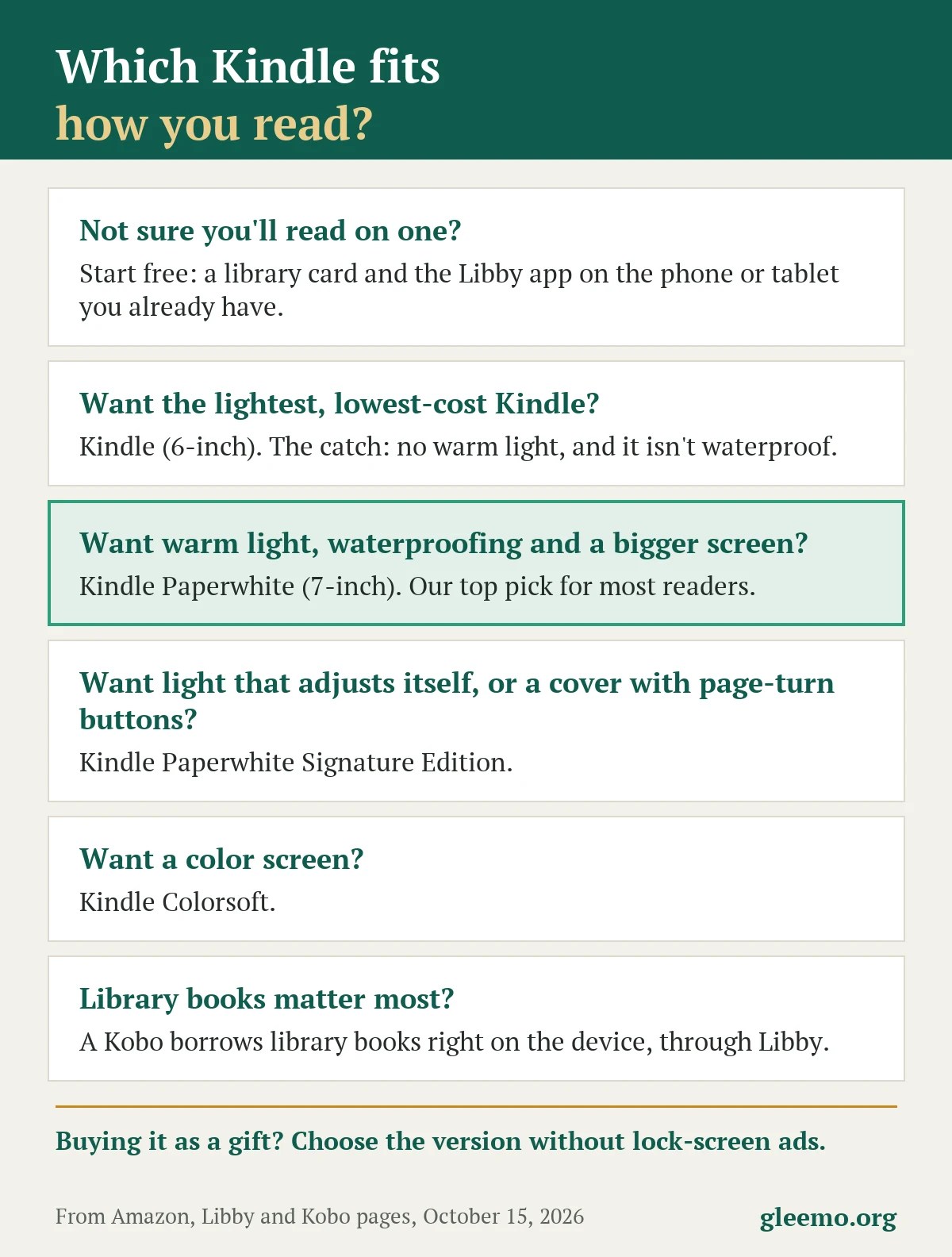
- Try it free first. A library card plus the free Libby app on a phone or tablet you own, or a Kobo. We earn nothing on those.
- Most readers: the Paperwhite. A 7-inch screen, adjustable warm light, waterproofing and up to 12 weeks of battery on Amazon’s test. It is an unreviewed pre-order.
- On a budget: the 6-inch Kindle. Lowest cost tier, but no adjustable warm light and no waterproofing.
- For a gift: choose the version without lock-screen ads. It costs more.
- Skip bundles with a subscription that renews on its own.
Try It Free First: Your Library, the Phone or Tablet You Own, or a Kobo
Borrow Ebooks Free With Your Library Card and the Libby App
Libby is free; all you need is a library card. It offers ebooks, audiobooks and magazines from your library on iPhone, iPad, Android and Fire tablets, or at libbyapp.com. Each library chooses what it offers, and loans return automatically on the due date, so there are no late fees.
To read in the app, open Shelf, then Loans, then Read With…, and choose Libby. Most ebooks can also go to a Kindle; see Libby’s Kindle help.
The fine print: Library books on a Kindle: US libraries only; an Amazon account is needed; not every title offers Kindle; loans return automatically on the due date. Libby on a phone or tablet works without a Kindle.
Read on the Phone or Tablet You Already Own
The Kindle app is free on iPhone and iPad, and free to download on Android (Google Play labels it "Contains ads" and "In-app purchases"). Borrow one book that way and notice which text size you settle on; it previews whether a dedicated reader is worth buying.
If You Will Mostly Borrow: A Kobo Reads Library Books Through Libby, and We Earn Nothing
Kobo’s own page says library borrowing works through Libby, "available in select countries." Kobo’s help puts the United States on that list and names three current models: the Libra Colour, Clara Colour and Clara BW. Two limits: Libby audiobooks and magazines are not supported on Kobo, and Libby "may not be available at your local library." We earn nothing on a Kobo; here is Kobo’s e-reader page.
Your library card opens more than ebooks. See our guide to library memory labs for old photos.
Best Kindle for Seniors: Every Current Model in One Table (No Prices)
Cost is a tier, from lowest to premium, not a price.
| Option | Warm light | Waterproof | Battery (Amazon’s "up to") | Lock-screen ads | Cost tier | The catch |
|---|---|---|---|---|---|---|
| Library and Libby on a phone or tablet you own | n/a | n/a | n/a | n/a | Free | Needs a library card; each library chooses what it offers |
| Kindle, 6-inch (16GB) | No | No | Up to 6 weeks | Your choice; without costs more | Lowest | Lighter, but no warm light and not waterproof |
| Kindle Paperwhite, 7-inch (16GB), top pick | Yes, adjustable | Yes (IPX8) | Up to 12 weeks | Your choice; without costs more | Middle | Pre-order, release date Oct 28; no reviews yet |
| Kindle Paperwhite Signature Edition, 7-inch (32GB) | Yes, plus auto-adjusting front light | Yes (IPX8) | Up to 12 weeks | Sold without ads (Amazon) | Premium | Pre-order, release date Oct 28; adds features, not a bigger screen |
| Kindle Colorsoft, 7-inch color (16GB) | Yes | Yes (IPX8) | Up to 8 weeks | Sold without ads (Amazon) | Premium | Pre-order, release date Oct 28; a color screen plain novels don’t need |
| Kobo Clara BW, 6-inch (16GB) | ComfortLight PRO (Kobo’s name) | Yes (IPX8, per Kobo) | Up to 53 days (Kobo’s test) | Not checked | Lowest | Borrows library books through Libby; no page-turn buttons listed; we earn nothing |
Note: Amazon’s battery figures are "up to" maximums. Amazon’s own test assumption: about half an hour of reading a day, wireless off, light at setting 13. Real use varies. Facts as of October 15, 2026; cost tiers are relative, so check each listing for current prices.
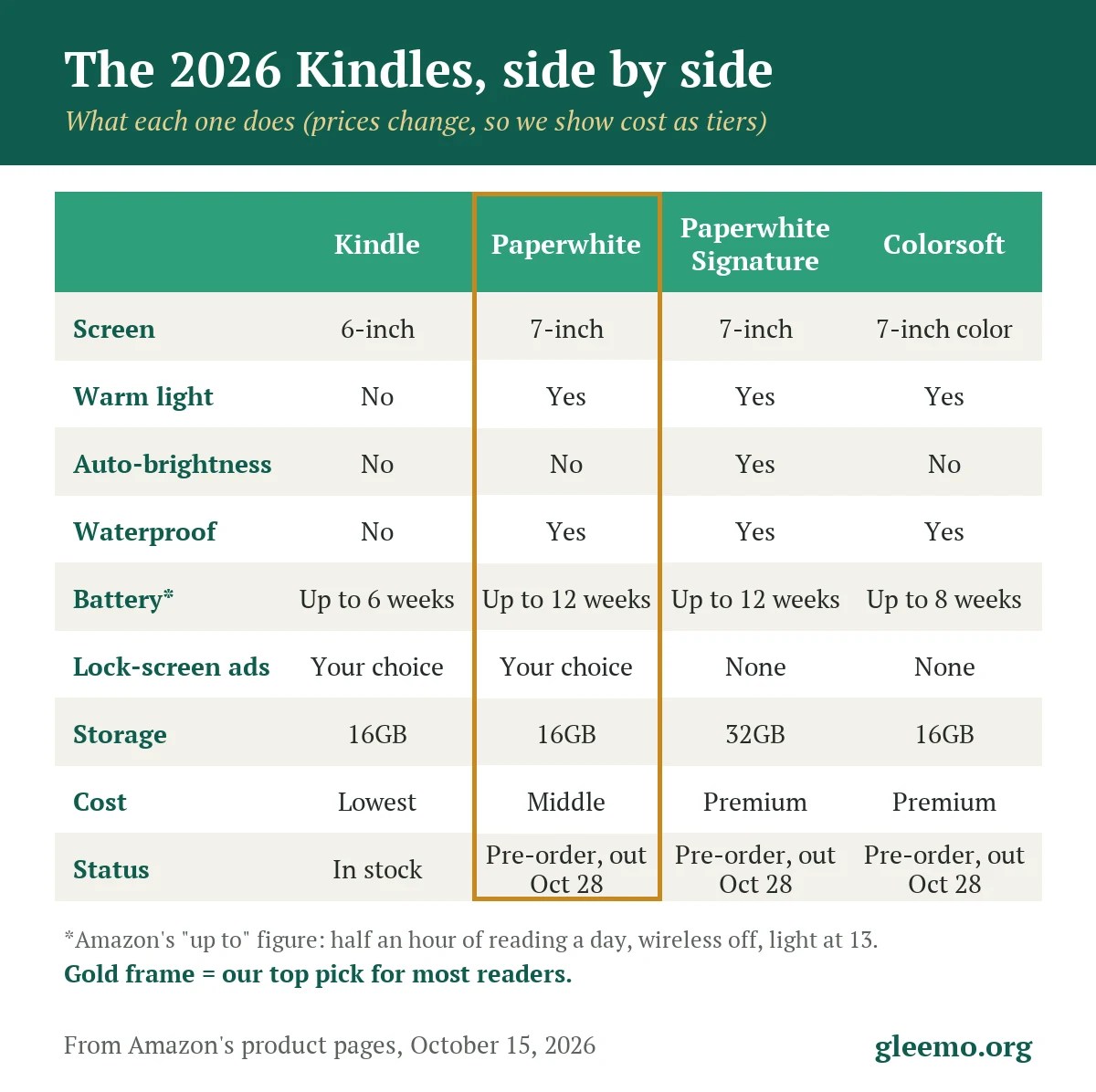
We read each model’s details on Amazon’s own pages on October 15, 2026. The 6-inch aluminum Kindle (32GB, sold only without ads) sits between our lowest and middle tiers, with the same warm light, waterproofing and battery entries as the 6-inch Kindle.
Which Kindle for Whom: The Paperwhite for Most Readers, the 6-Inch on a Budget
Top pick for most readers: Kindle Paperwhite. On Amazon’s own grid it is the entry point to a 7-inch screen, adjustable warm light, waterproofing (IPX8) and a battery claim of up to 12 weeks. For a gift, choose the version without lockscreen ads. It has not been released: Amazon lists it as a pre-order with a release date of October 28, and shows no customer reviews yet.
Most Readers: The Paperwhite
The Paperwhite has the larger screen and a battery claim of up to 12 weeks against the 6-inch Kindle’s 6. Amazon describes the waterproofing (IPX8) as "tested to withstand immersion in 2 meters of fresh water for 60 minutes." The catches: it weighs 204 grams to the 6-inch Kindle’s 140, and it is an unreviewed pre-order. This link opens the version without lockscreen ads.
Check the current price on Amazon
If Money Is Tight: The 6-Inch Kindle, With Its Catches
The 6-inch Kindle is in stock and sits in our lowest cost tier. On Amazon’s grid it has no adjustable warm light, no waterproofing and a battery claim of up to 6 weeks. This link opens the ad-supported version, which costs less than the version without lockscreen ads; the listing’s Offer Type selector switches it.
Check the current price on Amazon
The Premium Pick: The Signature Edition, If You Want the Extras
The Paperwhite Signature Edition keeps the 7-inch screen and adds an auto-adjusting front light, 32GB of storage, an aluminum back, double-tap page turns and support for the Page Turn Cover. It is sold without ads and sits in our premium tier.
See the Signature Edition on Amazon
Color: The Colorsoft, If You Want a Color Screen
The Kindle Colorsoft (also on Amazon) has a 7-inch color screen, costs more than the Paperwhite and lists up to 8 weeks of battery against 12. Plain novels do not need color.
Does a Kindle Have Large Print? How Big the Text Can Get
Yes, you can make the text bigger, and Amazon’s pages say "bigger text, bold fonts, and a built-in screen reader." On Amazon’s text display help page, tap the top of the screen, choose Aa, and change the size with a slider, plus and minus buttons, or a pinch. The same menu offers fonts, bold in five levels, spacing and margins, and Amazon’s pages also list dark mode. Amazon states no maximum text size and no figure for words per page on a 6-inch versus a 7-inch screen, so we quote none.
Gleemo compares features, not eyesight. If reading print has become harder, your eye doctor is the right person to ask.
Warm light is Yes on the Paperwhite, the Colorsoft and both Signature Editions, and No on both 6-inch Kindles. The Signature Editions add an auto-adjusting front light.
Kindle Page-Turn Buttons: What You Can Still Get
The Kindle Oasis, the last Kindle with physical page-turn buttons, is gone; in October 2024 Amazon said it would not restock it (TechRadar, Oct 17, 2024). The Click works only with Kindles from 2024 onward; the Page Turn Cover fits only the two Signature Editions. No current Kindle has built-in physical page-turn buttons. Your options:
- Touch. Tap the right side to go forward, the left to go back, or swipe, as Amazon’s page-turn help explains.
- Double-tap (Signature Editions). Tap twice quickly on the side or back to advance the page.
- Kindle Click (also on Amazon). A pre-order Bluetooth remote with two big forward and back buttons. Amazon warns it does not work with Kindles launched before 2024, including the 2022 Kindle and the 11th-generation Paperwhite.
- Page Turn Cover (also on Amazon). Physical buttons in a magnetic cover, with no battery, pairing or charging. A pre-order, for the Signature Editions only.
- Kobo Libra Colour. The one Kobo we verified with physical page-turn buttons, per Kobo’s page.
We give no arrival date for the Click or the Cover. Amazon’s Click listing shows later delivery estimates than the other new devices, and Good e-Reader reported on October 2 that Click and Cover orders would be delayed; Amazon’s Cover listing does not show that. Plan for them to arrive separately, and later.
Ads or No Ads: What Lock-Screen Ads Mean for a Gift
Ad-supported Kindles show "sponsored screensavers" on the lock screen, in Amazon’s words. The 6-inch Kindle (16GB) and the Paperwhite come both ways, and the version without ads costs more; the listing shows the difference. The Colorsoft, both Signature Editions and the 6-inch aluminum Kindle are sold without ads.
On a gift this is the trap: you choose the Kindle, but the person you give it to sees the lock screen every day. You can remove ads later for a one-time fee. On Amazon’s help page, open Manage Your Devices, select the Kindle, and choose Remove offers. A pop-up shows the price, and your 1-Click payment method is charged.
Giving a Kindle as a Gift: Set It Up Before You Wrap It
- Decide whose account. If you mark the order as a gift, Amazon says the Kindle will not be linked to your account, and the recipient registers it to their own Amazon account during setup.
- Have Wi-Fi and an Amazon account ready. Amazon: "Wi-Fi and an Amazon account are required to set up your Kindle and download books." If you set it up for Mom or Dad, do it with their OK.
- Add the library card in Libby and borrow a first book. A book sent from Libby appears on the devices on that Amazon account.
- Set the text size together: tap the top of the screen, then Aa.
- Think twice about sharing books. Sharing Kindle books between two adult accounts means joining an Amazon Family. Amazon says the organizer’s payment method is shared with the other adult and can be used for purchases.
- Pack a charging cable. The box for the 2026 Kindles lists the Kindle and a quick start guide; the 6-inch listings say a USB-C charging cable is not included. Have a cable and charger ready before wrapping.
- Check the return window on the listing. Amazon says gift recipients can return items marked as a gift using the packing-slip order number.
Want a paper gift as well? See our guide to large-print puzzle books as a paper gift.
What to Skip: Subscription Bundles, Sling Bags and Unchecked Gadgets
- Kindle bundles with Kindle Unlimited. Amazon’s help says the free trial converts to a monthly paid plan that continues unless you cancel. Try your library first. We link no trials.
- Sling-bag bundles. They add a sling bag to pre-order items no one has reviewed. Buy the parts separately.
- Third-party page-turner gadgets. We have not checked other makers’ gadgets; Amazon’s Click states which Kindles it works with.
Two honest trade-offs. Kindle books are tied to your Amazon account (the Kindle Store Terms of Use, updated June 30, 2026, say "Kindle Content is licensed, not sold, to you by the Content Provider"), and library loans end on their due date.
When to Buy: The October 28 Release Date and the Holidays
What Changed This Fall
Amazon’s 2026 lineup launched October 1. The 6-inch Kindles are in stock; the Paperwhite, Signature Edition, Colorsoft, Click and Cover are pre-orders with a release date of October 28, 2026. Amazon raised Kindle prices in August 2026, and an Amazon spokeswoman told Fortune (August 21, 2026) the cause was higher memory and storage costs.
Is the New Paperwhite Worth It Over Last Year’s?
Last year’s Paperwhite (the 2024 model) is still sold new as of October 15, with the same 7-inch screen, 12-week battery claim and IPX8 waterproofing on Amazon’s listing. The 2026 model is lighter (204 grams against 211). The 2024 model works with the Click but not the Page Turn Cover.
What Could Change This Advice
- Hands-on reviews or early-batch problems after October 28 could change our top pick to "no clear winner."
- The October 28 release date could slip.
- Amazon could relabel or retire the ad-supported or ad-free versions, so check the Offer Type selector.
- A price rise or a promotion could shift the cost tiers.
We will update this page before Black Friday and are not predicting a discount. Pre-ordering? Our pre-order checklist for a new device, written for the iPhone Duo, covers the card, address and return-window checks.
How We Built This Guide
We compared Amazon’s, Libby’s and Kobo’s own published pages on October 15, 2026, and read Fortune, TechRadar and Good e-Reader for three dated news facts. We did not hands-on test any of these models. The cost tiers come from the list prices we read that day.
Frequently Asked Questions
Which Kindle is best for an older person?
For most readers, the Paperwhite, though it is an unreviewed pre-order; the 6-inch Kindle or the library route is a fair start. For the easiest Kindle to use, Amazon does not rank its models by ease and we did not hands-on test them.
Does a Kindle have large print?
You can make the text bigger: tap the top of the screen, choose Aa, and use the slider. Amazon states no maximum size.
Can you still get a Kindle with page-turn buttons?
Not built in. Your options are the Click remote, the Page Turn Cover or a Kobo Libra Colour.
Is a Kindle without ads worth it?
For a gift, we think so. Ads show on the lock screen, and removing them later costs a one-time fee.
Can I borrow library books on a Kindle?
Yes, through Libby at US libraries, with an Amazon account. Not every title offers Kindle.
Facts as of October 15, 2026. Amazon can change stock, release dates and prices, so check each listing before you buy.
Where to Start This Week
Before you buy anything, add your library card to the free Libby app on the phone or tablet you already own and borrow one book this week. If you still want a Kindle after that, the table above shows which one fits how you read. More clear, honest guides for your next chapter are at gleemo.org.
Photo: Aliis Sinisalu / Unsplash
